WProxy
A Linux desktop tool for managing Xray and V2Ray connections with VLESS, VMess, Trojan, and Shadowsocks support.
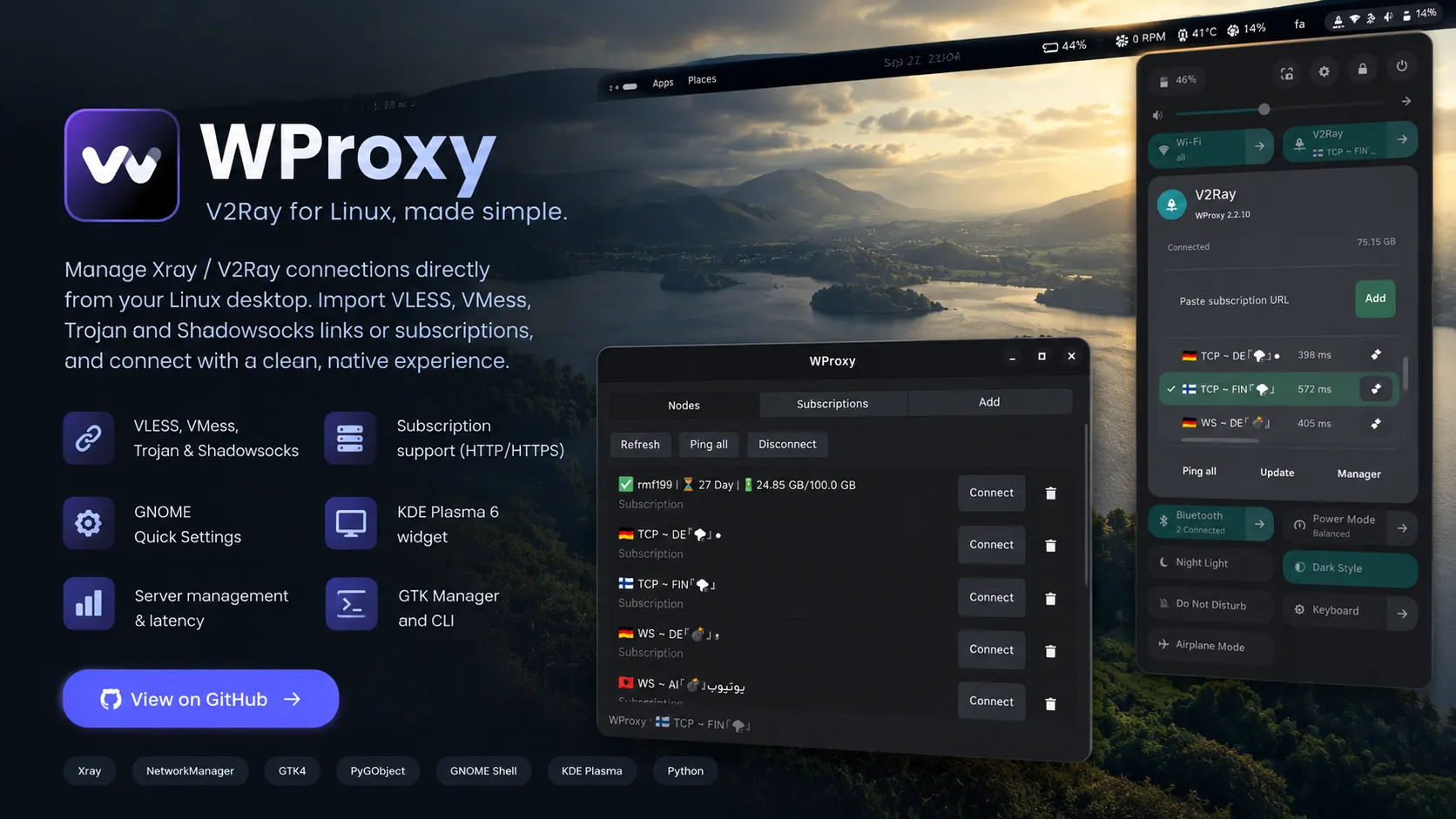
About the project / دربارهٔ پروژه
# WProxy
## V2Ray for Linux and Windows, made simple.
WProxy is an open-source desktop client for managing **Xray and V2Ray connections** on Linux and Windows.
Import **VLESS, VMess, Trojan, and Shadowsocks** links or HTTP(S) subscriptions, organize multiple subscription sources, check server latency, and control your connection from a clean desktop interface.
[Download WProxy 2.5.0](https://github.com/Aliazadi-1776/WProxy-v2ray/releases/latest) ·
[Linux Installation](https://github.com/Aliazadi-1776/WProxy-v2ray#install) ·
[Windows Guide](https://github.com/Aliazadi-1776/WProxy-v2ray/blob/main/docs/WINDOWS.md) ·
[View on GitHub](https://github.com/Aliazadi-1776/WProxy-v2ray)
## Features
- VLESS, VMess, Trojan and Shadowsocks support
- HTTP and HTTPS subscription imports
- Multiple independent subscriptions
- Server management and latency testing
- GNOME Quick Settings integration
- KDE Plasma 6 panel widget
- Windows 10/11 x64 tray application
- Application and website split routing
- Subscription traffic and expiry information
- GTK4 desktop manager
- Command-line interface
- NetworkManager integration on Linux
- Xray-powered system TUN connections
## Desktop Integration
WProxy provides dedicated controls for:
- **GNOME 45–51:** manage and select servers directly from Quick Settings.
- **KDE Plasma 6:** use the WProxy panel and System Tray widget.
- **Windows 10/11 x64:** install WProxy with a ready-to-use Setup.exe and control it from the notification area.
The Linux backend integrates with **NetworkManager**, **Xray**, and the system TUN interface.
[See the complete compatibility table](https://github.com/Aliazadi-1776/WProxy-v2ray#compatibility)
## Split Routing for Apps and Websites
Choose how traffic should be routed:
- Send all traffic through the VPN
- Bypass selected applications and websites
- Route only selected applications and websites through the VPN
The graphical manager includes an application picker, while the CLI provides the same routing controls for advanced users.
[Read the routing guide](https://github.com/Aliazadi-1776/WProxy-v2ray/blob/main/docs/ROUTING.md)
## Download and Install
### Windows
Download the latest Windows installer:
[Download WProxy for Windows](https://github.com/Aliazadi-1776/WProxy-v2ray/releases/latest)
The installer includes WProxy, Xray and Wintun. A separate Python or Xray installation is not required.
### Linux
Installation instructions are available for:
- Ubuntu, Debian, Kubuntu and Linux Mint
- Arch Linux, EndeavourOS and Manjaro
- Fedora Workstation and Fedora KDE
- openSUSE Tumbleweed
[View Linux installation commands](https://github.com/Aliazadi-1776/WProxy-v2ray#install)
## Built With
[`Xray`](https://github.com/XTLS/Xray-core) ·
[`NetworkManager`](https://networkmanager.dev/) ·
`GTK4` ·
`PyGObject` ·
`GNOME Shell` ·
`KDE Plasma` ·
`Python` ·
`PowerShell`
## Open Source
WProxy is open source and distributed under the
[MIT License](https://github.com/Aliazadi-1776/WProxy-v2ray/blob/main/LICENSE).
You can review the source code, report problems, or contribute improvements on GitHub.
[Source Code](https://github.com/Aliazadi-1776/WProxy-v2ray) ·
[Latest Release](https://github.com/Aliazadi-1776/WProxy-v2ray/releases/latest) ·
[Report an Issue](https://github.com/Aliazadi-1776/WProxy-v2ray/issues) ·
[Persian Documentation](https://github.com/Aliazadi-1776/WProxy-v2ray/blob/main/README.fa.md)
## V2Ray for Linux and Windows, made simple.
WProxy is an open-source desktop client for managing **Xray and V2Ray connections** on Linux and Windows.
Import **VLESS, VMess, Trojan, and Shadowsocks** links or HTTP(S) subscriptions, organize multiple subscription sources, check server latency, and control your connection from a clean desktop interface.
[Download WProxy 2.5.0](https://github.com/Aliazadi-1776/WProxy-v2ray/releases/latest) ·
[Linux Installation](https://github.com/Aliazadi-1776/WProxy-v2ray#install) ·
[Windows Guide](https://github.com/Aliazadi-1776/WProxy-v2ray/blob/main/docs/WINDOWS.md) ·
[View on GitHub](https://github.com/Aliazadi-1776/WProxy-v2ray)
## Features
- VLESS, VMess, Trojan and Shadowsocks support
- HTTP and HTTPS subscription imports
- Multiple independent subscriptions
- Server management and latency testing
- GNOME Quick Settings integration
- KDE Plasma 6 panel widget
- Windows 10/11 x64 tray application
- Application and website split routing
- Subscription traffic and expiry information
- GTK4 desktop manager
- Command-line interface
- NetworkManager integration on Linux
- Xray-powered system TUN connections
## Desktop Integration
WProxy provides dedicated controls for:
- **GNOME 45–51:** manage and select servers directly from Quick Settings.
- **KDE Plasma 6:** use the WProxy panel and System Tray widget.
- **Windows 10/11 x64:** install WProxy with a ready-to-use Setup.exe and control it from the notification area.
The Linux backend integrates with **NetworkManager**, **Xray**, and the system TUN interface.
[See the complete compatibility table](https://github.com/Aliazadi-1776/WProxy-v2ray#compatibility)
## Split Routing for Apps and Websites
Choose how traffic should be routed:
- Send all traffic through the VPN
- Bypass selected applications and websites
- Route only selected applications and websites through the VPN
The graphical manager includes an application picker, while the CLI provides the same routing controls for advanced users.
[Read the routing guide](https://github.com/Aliazadi-1776/WProxy-v2ray/blob/main/docs/ROUTING.md)
## Download and Install
### Windows
Download the latest Windows installer:
[Download WProxy for Windows](https://github.com/Aliazadi-1776/WProxy-v2ray/releases/latest)
The installer includes WProxy, Xray and Wintun. A separate Python or Xray installation is not required.
### Linux
Installation instructions are available for:
- Ubuntu, Debian, Kubuntu and Linux Mint
- Arch Linux, EndeavourOS and Manjaro
- Fedora Workstation and Fedora KDE
- openSUSE Tumbleweed
[View Linux installation commands](https://github.com/Aliazadi-1776/WProxy-v2ray#install)
## Built With
[`Xray`](https://github.com/XTLS/Xray-core) ·
[`NetworkManager`](https://networkmanager.dev/) ·
`GTK4` ·
`PyGObject` ·
`GNOME Shell` ·
`KDE Plasma` ·
`Python` ·
`PowerShell`
## Open Source
WProxy is open source and distributed under the
[MIT License](https://github.com/Aliazadi-1776/WProxy-v2ray/blob/main/LICENSE).
You can review the source code, report problems, or contribute improvements on GitHub.
[Source Code](https://github.com/Aliazadi-1776/WProxy-v2ray) ·
[Latest Release](https://github.com/Aliazadi-1776/WProxy-v2ray/releases/latest) ·
[Report an Issue](https://github.com/Aliazadi-1776/WProxy-v2ray/issues) ·
[Persian Documentation](https://github.com/Aliazadi-1776/WProxy-v2ray/blob/main/README.fa.md)
Built with / فناوریها
XrayV2RayNetworkManagerGTK4PyGObjectPythonGNOME ShellKDE PlasmaLinuxTUN