How Telegram Was Built: From the First App to MTProto
Telegram is one of those apps that looks simple until you start asking annoying questions about it. Like: What language was the original Telegram app written in? What exactly is MTProto? How does a Telegram client establish a key with a server? Why are Cloud Chats and Secret Chats architecturally different? And which parts of Telegram's backend are actually public?
So yeah, this is basically me poking Telegram with a screwdriver and asking what is actually going on underneath. We will go from the first clients to MTProto, the handshake, cloud chats, Secret Chats and the data centers. When Telegram gives us an answer, we use it. When it does not, we are not going to invent one just to make the article look clever.
---
<a id="origin"></a>
So, where did Telegram actually start?
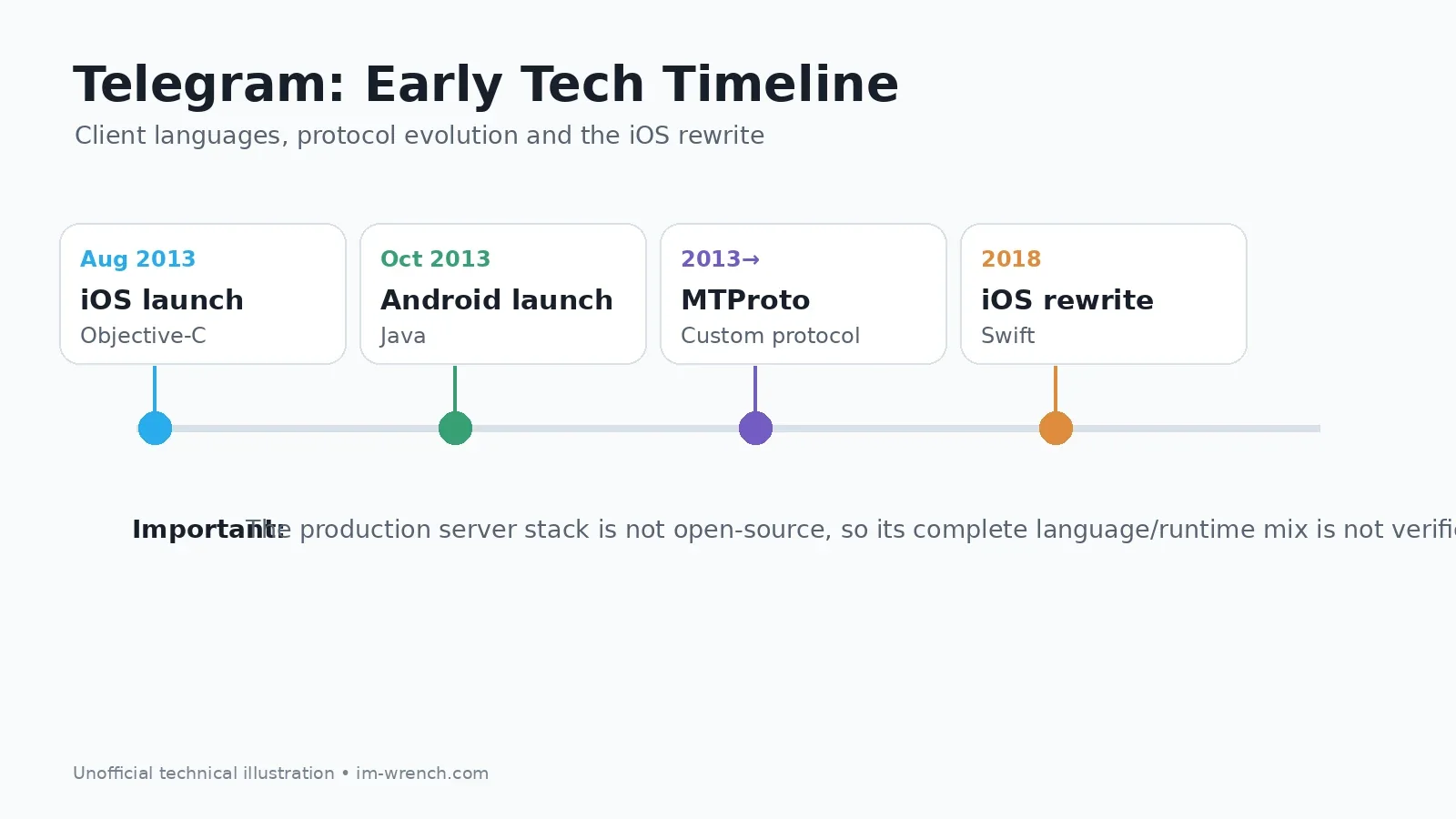
Telegram's own history says the iOS app launched on August 14, 2013. The first official Android release followed on October 20, 2013.

The project came from brothers Pavel Durov and Nikolai Durov. Telegram's official FAQ describes Pavel's contribution as financial and ideological, while Nikolai's contribution was technical. Nikolai designed the custom data protocol that became the foundation of Telegram: MTProto.
And this is where things get interesting. Telegram was not just a pretty chat UI sitting on top of some boring REST API. Its communication model was built around a custom protocol stack intended to work efficiently across mobile networks and multiple data centers.
Official references: Telegram FAQ and A (Not So) Brief History of Telegram.
A contemporary TechCrunch report from October 2013 also described Telegram as being based on a custom protocol built by Nikolai Durov and already distinguished ordinary cloud chats from end-to-end encrypted Secret Chats: TechCrunch — Meet Telegram.
---
<a id="first-code"></a>
So... what language was the original Telegram written in?
The annoying answer is: it depends on which part you mean. The clients and the server infrastructure are different beasts.
iOS: the original client was Objective-C
When Telegram announced its major iOS rewrite in 2018, it explicitly said the older iOS client had been built with Objective-C and that the new version had been rebuilt from scratch in Swift.
That gives us a well-documented answer for the original iPhone client: Objective-C.
Official sources: Introducing Telegram 5.0 for iOS and Telegram X: Progress through Competition.
Android: early public code was Java-based
Telegram's official Android source repository contains early 1.3.x code as a conventional Java Android project, with source headers dating back to 2013.
Repository: DrKLO/Telegram.
So, if you just came here for the answer and do not want the nerdy rabbit hole yet:
- Original iOS client: Objective-C
- Early Android client: Java
- Communication protocol: MTProto
- Production server/backend: not open source, and the complete language/runtime stack is not officially documented
And yeah, this distinction matters. You will find articles confidently claiming Telegram's backend is written in a specific language or a precise combination of technologies. Some of those claims may describe real components, but Telegram does not publish its server-side source, so they should not be treated as verified descriptions of the complete production stack without a primary source.
---
<a id="mtproto-origin"></a>
Who actually made MTProto?
Telegram's FAQ draws a clear line between the founders' roles: Pavel Durov supported the project financially and ideologically, while Nikolai Durov provided the core technical input and developed Telegram's custom data protocol.
People often throw around “MTProto” as if it just means “Telegram encryption”. Nope. That is way too small a box for it. It covers several responsibilities:
- API query and response representation
- sessions
- authorization and key establishment
- client-server encryption
- message IDs and acknowledgments
- message containers
- binary transport framing
- multiple underlying transports
- operation across multiple data centers
A better way to think about it is: MTProto is the stack sitting between the Telegram client and the Telegram API, handling a lot more than encryption.
Official documentation: MTProto Mobile Protocol.
---
<a id="architecture"></a>
What does Telegram actually look like underneath?

At a very high level, it looks something like this. Do not worry, the real thing is messier :)
+---------------------------+
| Telegram Client           |
| iOS / Android / Desktop   |
+-------------+-------------+
              |
              | Telegram API / RPC
              | TL serialization
              | MTProto encryption
              | TCP / HTTP / HTTPS / WS
              v
+-------------+-------------+
| Telegram Data Center (DC) |
+-------------+-------------+
              |
              +--> account/session state
              +--> cloud chat data
              +--> media/file infrastructure
              +--> routing to other services/DCs
Telegram's official MTProto documentation divides the protocol into three largely independent components:
1. A high-level API/RPC component
2. A cryptographic and authorization layer
3. A transport component
The transport layer can operate over TCP, HTTP, HTTPS, WebSocket and secure WebSocket variants.
That separation is actually pretty neat: a Telegram session is not simply “one HTTP request” or “one permanent TCP socket.” The session belongs to the application instance and authorization context, while network connections can come and go.
---
<a id="what-is-mtproto"></a>
Okay, but what is MTProto actually doing?
A simplified request goes through something roughly like this:
API call
  -> TL serialization
  -> MTProto message
  -> session metadata
  -> encryption
  -> MTProto transport framing
  -> TCP/HTTP/HTTPS/WebSocket
  -> Telegram data center
A Telegram message is not just “hello bro”
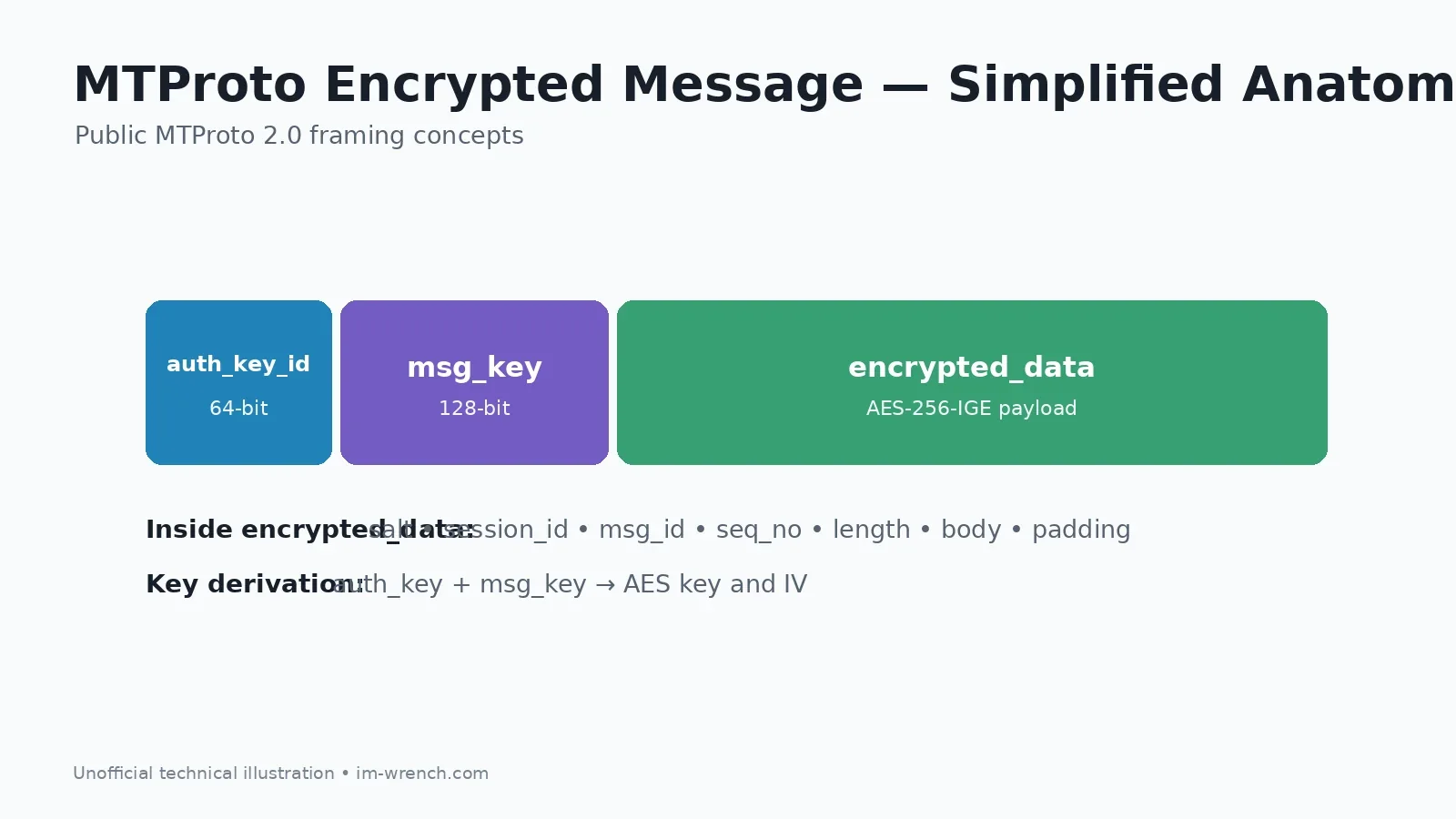
At the protocol level, an MTProto message contains or is associated with concepts such as:
msg_idmsg_seqno- message length
- body
- session
- server salt
- authorization-key identifier
- message key
These fields are doing real work. They are part of how the protocol keeps track of messages, ordering and replay related checks. Message IDs and sequence numbers help with ordering, acknowledgments and replay-related checks.
MTProto 1.0 vs. MTProto 2.0
Telegram originally used MTProto 1.0. MTProto 2.0 later changed key-derivation details, including the main msg_key construction, using SHA-256 and including padding in the calculation.
Telegram's documentation now treats MTProto 1.0 as deprecated.
MTProto 2.0 — Detailed Description
---
<a id="handshake"></a>
The part where Telegram and your client have to trust each other
Before normal encrypted API traffic starts flying around, the client needs an Authorization Key shared with the Telegram server. Basically, they need to agree on a secret without shouting the secret across the internet.
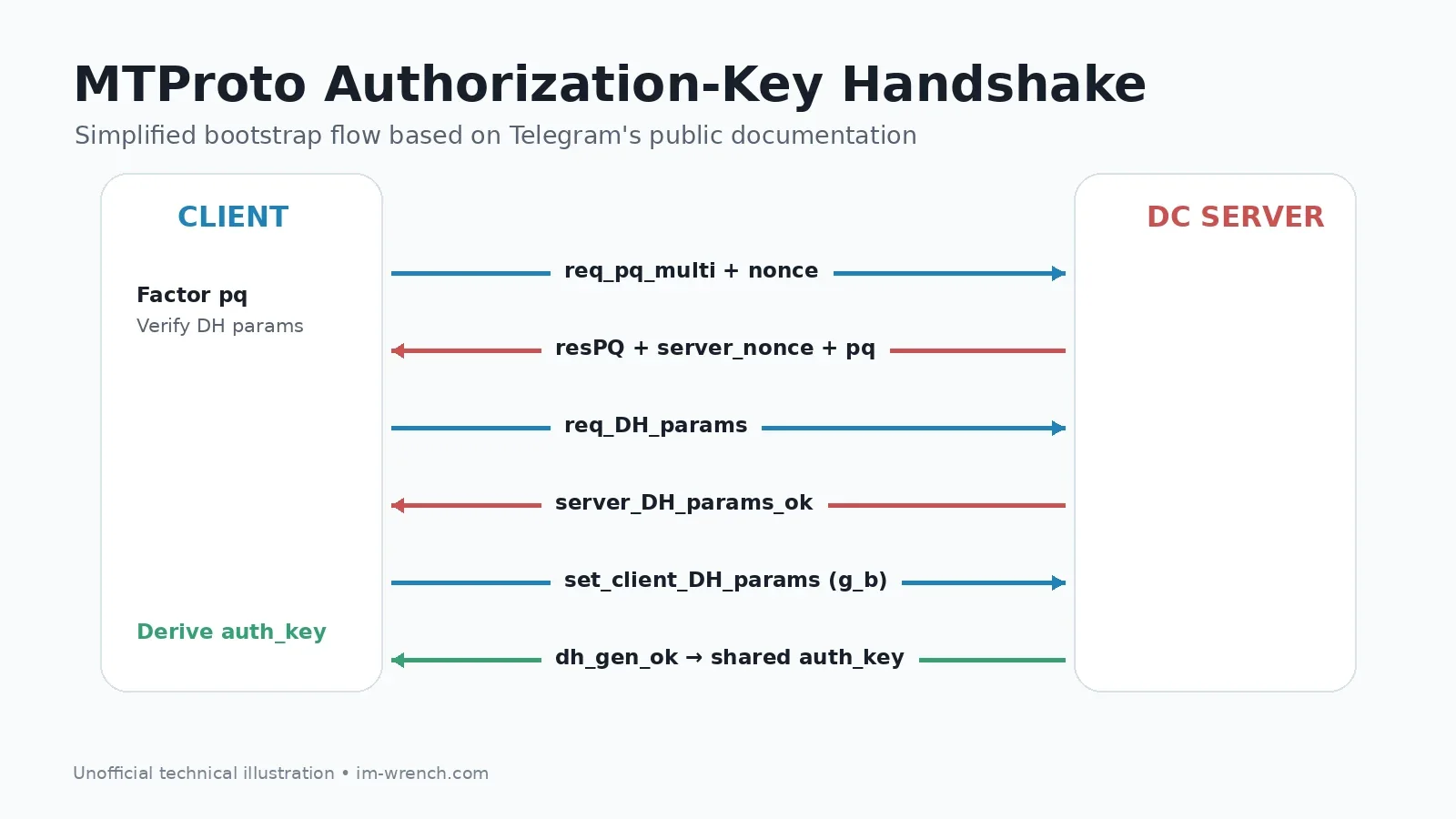
Telegram documents this as a 2048-bit client-server key established through a Diffie-Hellman exchange. The key itself is not sent directly over the network.
The simplified version looks like this. The real protocol is obviously less “three boxes and done” :)
sequenceDiagram
    participant C as Telegram Client
    participant S as Telegram DC

    C->>S: req_pq_multi + nonce
    S-->>C: resPQ + server_nonce + pq + RSA fingerprints
    C->>C: factor pq -> p, q
    C->>S: req_DH_params (RSA protected)
    S-->>C: server_DH_params_ok
    C->>C: verify DH params and generate b
    C->>S: set_client_DH_params (g_b)
    S-->>C: dh_gen_ok
    C->>C: auth_key established
Step 1: req_pq_multi
The client creates a random nonce and sends the first unencrypted bootstrap request.
Step 2: resPQ
The server replies with pq, a server_nonce, and fingerprints for the server's RSA public keys.
Step 3: factor pq
The client factors pq into primes p and q. This is part of Telegram's bootstrap protocol.
Step 4: authenticate server parameters and start DH
The client protects the required data using the selected server public key and sends req_DH_params. The server responds with Diffie-Hellman parameters.
Step 5: derive the shared auth_key
The client generates its own random value, sends g_b, and both sides derive the same shared authorization key.
The complete procedure includes additional nonce checks, hashes, safe-prime validation, retry behavior and other safeguards.
For the exact protocol, read Telegram's step-by-step documentation: Creating an Authorization Key.
---
<a id="message-flow"></a>
What Happens After You Press Send?
Once the client has an authorization key, a Cloud Chat message follows a path similar to this:
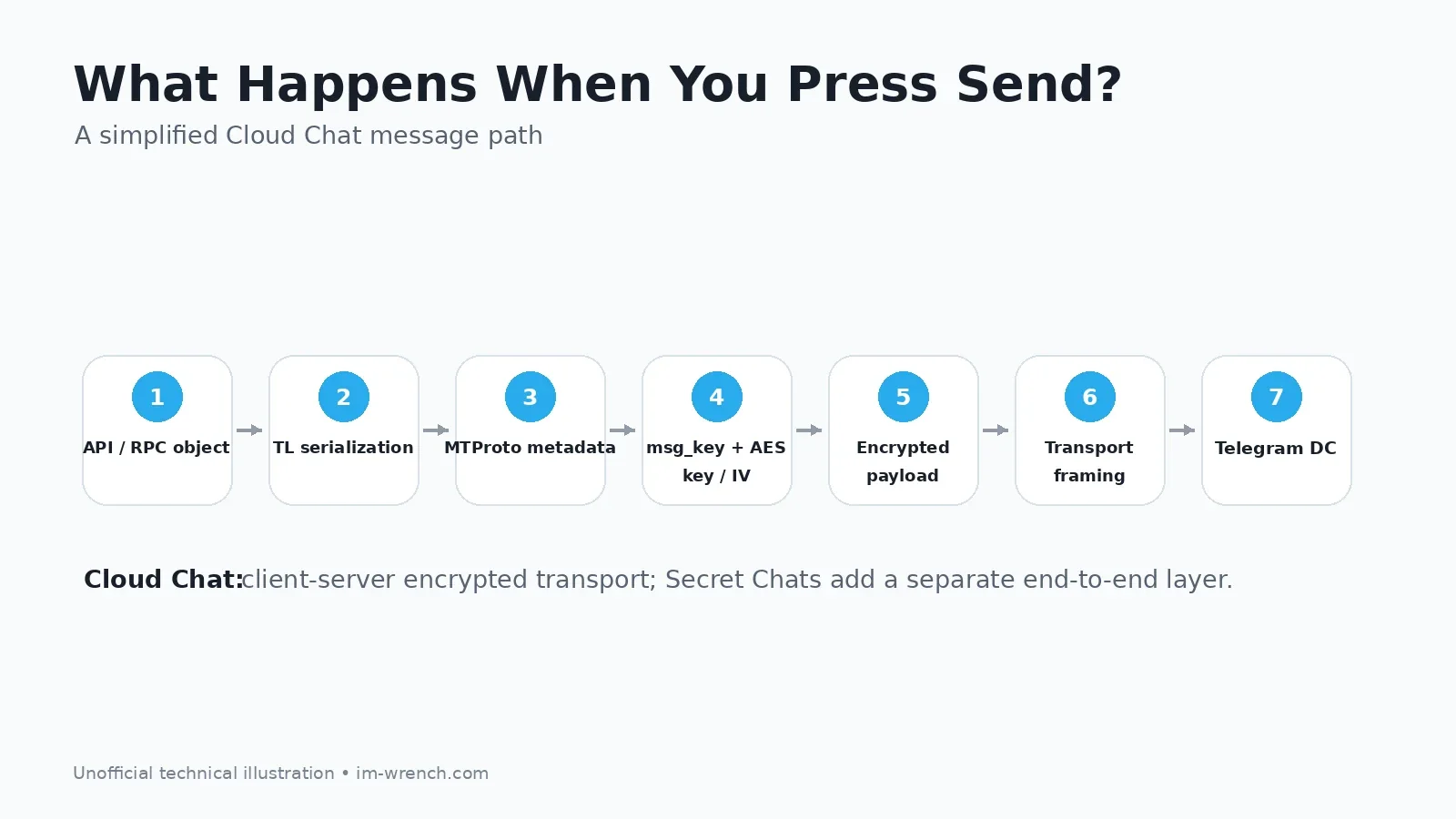
1. User taps Send
2. Client creates an API/RPC object
3. The object is serialized with TL
4. MTProto adds session and message metadata
5. A message key is calculated
6. AES key and IV are derived
7. The payload is encrypted
8. MTProto transport framing is added
9. The packet travels to a Telegram DC
10. The server processes the RPC
11. Acknowledgment/update/response returns
12. Other logged-in devices receive cloud updates
Under MTProto 2.0, Telegram documents that auth_key and msg_key are used to derive an AES key and IV, and the encrypted payload uses AES-256-IGE.
This is the client-server encryption path used for Cloud Chats. Secret Chats add a separate end-to-end encryption layer.
MTProto 2.0 — Detailed Description
---
<a id="cloud-vs-secret"></a>
Cloud Chats vs. Secret Chats: same app, very different idea
This is one of the most important architectural distinctions in Telegram and one of the most commonly misunderstood.
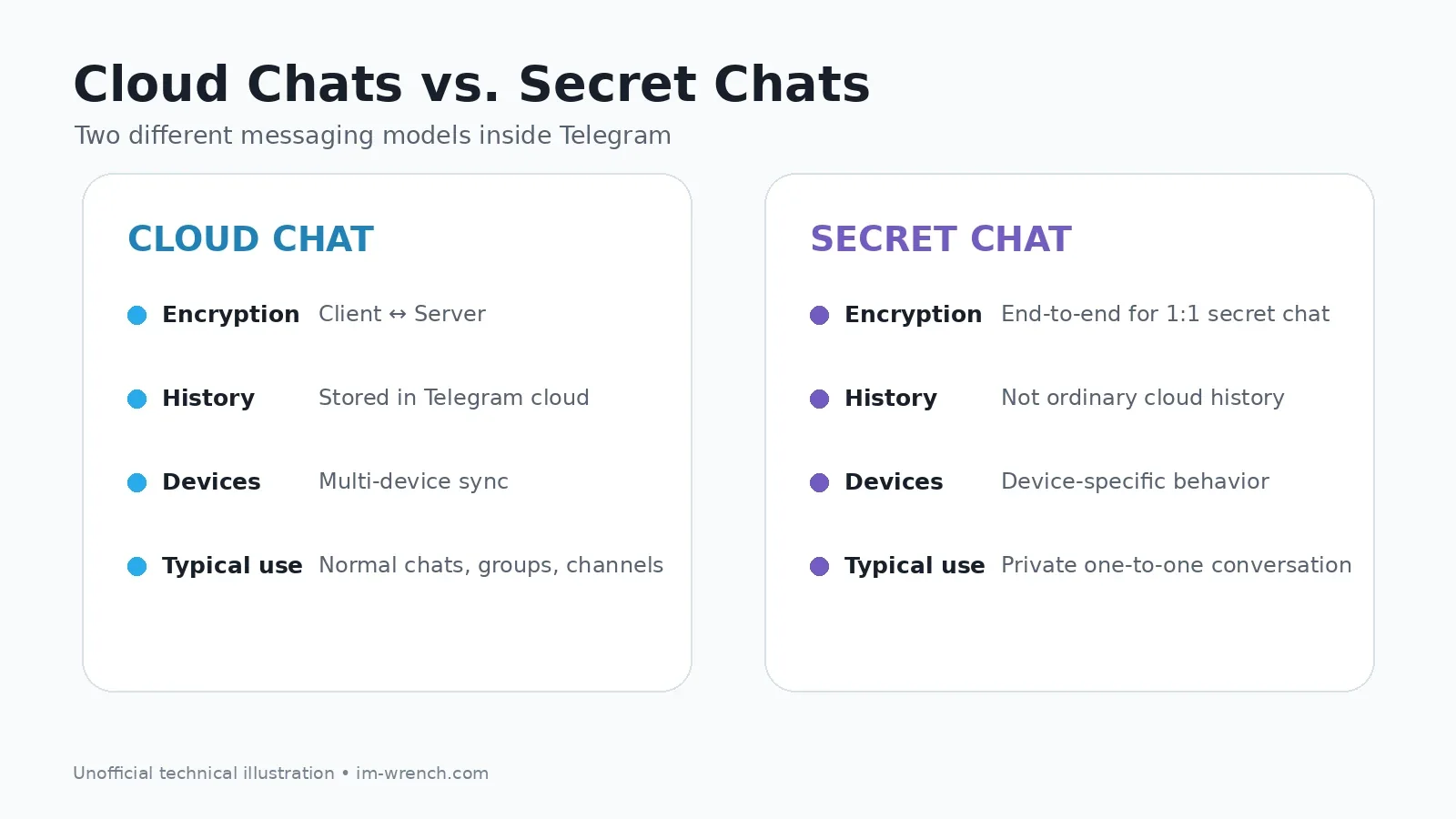
Cloud Chats
Normal Telegram conversations are Cloud Chats. They are designed to synchronize across your devices and allow you to access your history after logging in elsewhere.
In this model, client-server traffic is protected by MTProto, but it is not the same end-to-end model used by Secret Chats.
Architectural benefits include:
- multi-device synchronization
- access to history from newly authorized devices
- centralized message and file availability
- a consistent experience across mobile and desktop
Secret Chats
Secret Chats are one-to-one end-to-end encrypted conversations. Telegram's documentation says their keys are held only by the chat participants and their encryption schema is different from Cloud Chats.
Secret Chat history does not behave like ordinary cloud-synchronized history across all devices.
Secret Chats — End-to-End Encryption
Is all Telegram messaging end-to-end encrypted?
No. A more accurate statement is:
Telegram uses MTProto client-server encryption for Cloud Chats and a separate end-to-end encryption layer for Secret Chats.
That distinction should be explicit in any serious technical or security discussion of Telegram.
---
<a id="datacenters"></a>
Data Centers and Multi-Device Sync
Telegram is not a single-server system. Its API documentation says servers are divided into multiple data centers (DCs) in different parts of the world.
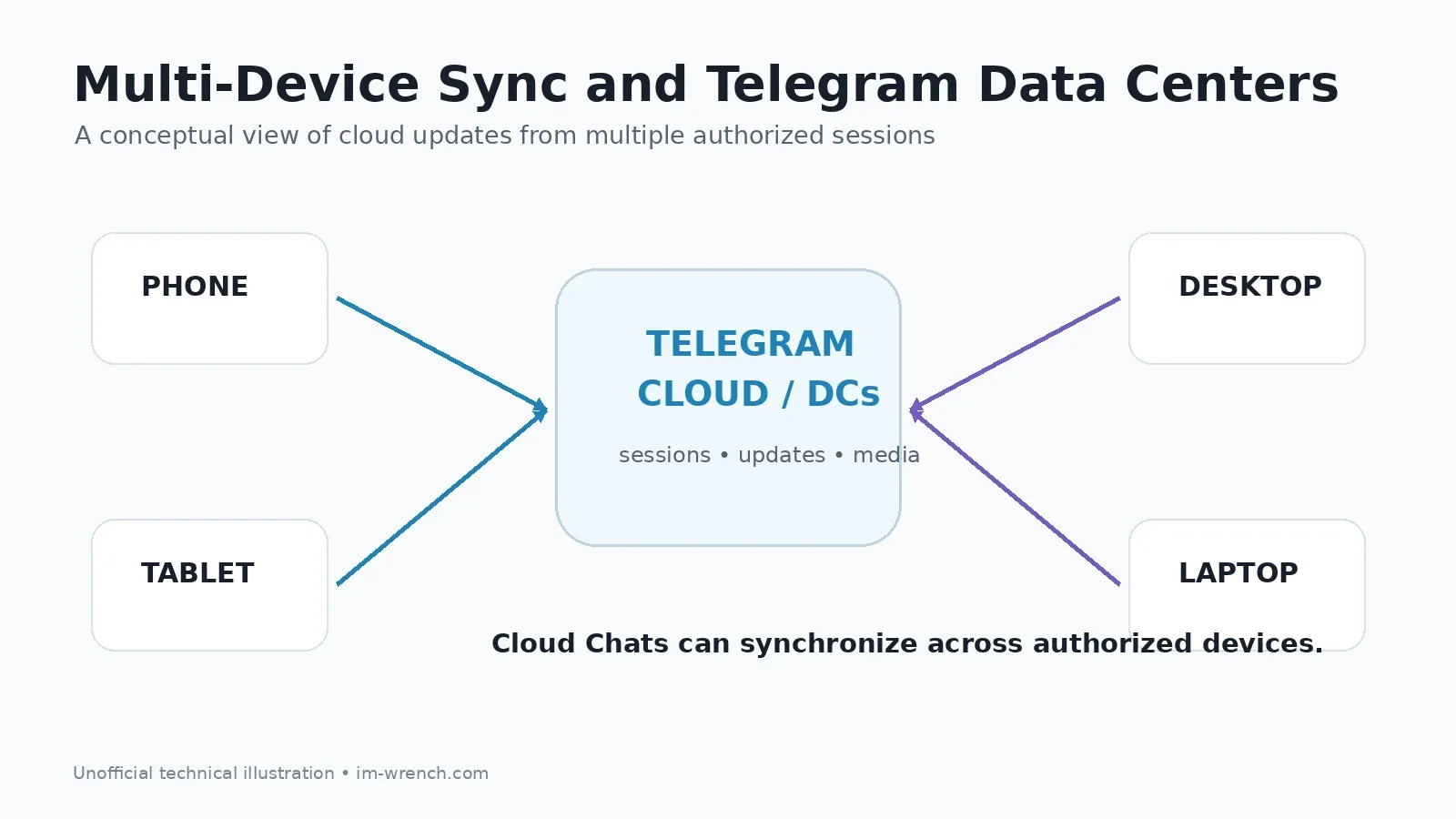
Clients can obtain DC endpoints through configuration data, and Telegram notes that IP addresses and ports may change depending on load and user location.
This architecture has several practical consequences.
1. Flexible routing
Multiple DCs allow Telegram to choose and change access endpoints rather than relying on one global server address.
2. Sessions survive connection changes
An MTProto session is attached to the application instance and authorization context, not permanently to one TCP socket. Reconnecting does not necessarily mean recreating the entire logical session.
3. Cloud synchronization
Because ordinary chat history belongs to Telegram's cloud service, multiple authorized devices can receive updates for the same account.
4. Media and file infrastructure
Telegram's API documentation also distinguishes data-center behavior for files, media and CDN-related endpoints.
Working with Different Data Centers
Uploading and Downloading Files
---
<a id="tl"></a>
TL: Telegram's Type and RPC Language
A less famous but important part of Telegram is TL, or Type Language.
TL describes types, constructors and API functions. Telegram needs a compact, deterministic way to say:
“These bytes represent a User,”
“This is a vector of message objects,”
or “This packet invokes a particular RPC method.”
A conceptual example looks like:
user id:int first_name:string last_name:string = User;
getUsers (Vector int) = Vector User;
These structures are then serialized into a binary representation.
This is important because Telegram's core API protocol is not built around verbose textual JSON. TL gives it typed binary serialization and a schema that can drive client implementations and code generation.
---
<a id="why-custom"></a>
Why Telegram Built a Custom Protocol
Telegram says its protocol was designed for mobile access and operation across multiple data centers. That helps explain why MTProto bundles session logic, authorization, binary RPC and transport behavior instead of acting as a single cryptographic primitive.
From an engineering perspective, the advantage is control: Telegram can evolve its protocol stack around the behavior of its own messaging service.
From a security perspective, custom cryptographic protocols attract extra scrutiny. Security engineers generally prefer protocols and constructions that have received extensive independent analysis.
One academic symbolic analysis of MTProto 2.0 used ProVerif and established several intended security properties in its model, while also identifying an unknown key-share issue in the rekeying protocol. That is a useful reminder that protocol security is not a binary label; it is something that improves through specification, review, attack research and iteration.
Paper: Automated Symbolic Verification of Telegram's MTProto 2.0
---
<a id="swift"></a>
The Objective-C to Swift Rewrite
In 2018, Telegram announced that it had spent years rebuilding its iOS client from scratch in Swift. Telegram 5.0 for iOS was the result.
For a large messaging application, a rewrite like this is much more than changing syntax. It touches systems such as:
- application state management
- UI rendering
- local storage and caching
- network integration
- media pipelines
- background execution
- synchronization
- performance and battery behavior
The current iOS repository contains a mix of Swift, C, Objective-C and C++, but the modern application was rebuilt around Swift rather than the original Objective-C codebase.
Introducing Telegram 5.0 for iOS
---
<a id="unknowns"></a>
What We Do Not Know About Telegram's Servers
This is where open protocol and open-source backend must be separated.
Telegram publishes open-source client applications and documents its API and MTProto protocol. It does not publish its server-side source code.
Telegram's FAQ explicitly confirms that the server code is not available. It also says Telegram is a unified cloud service rather than a federated network where anyone can run an interoperable independent Telegram server.
That means we can inspect and discuss:
- MTProto message formats
- authorization-key generation
- TL serialization
- API behavior
- open-source clients
- client-facing DC behavior
- Cloud Chat vs. Secret Chat semantics
But we cannot infer the complete production backend implementation from client repositories.
In particular, the exact combination of backend languages, internal databases, service topology, queues and deployment architecture should not be presented as verified unless Telegram provides a primary source for it.
Telegram FAQ — Server-side code
---
<a id="security"></a>
Security Caveats and Common Misconceptions
“Telegram is open source, so the entire infrastructure is open source.”
No. The clients are open source; the server-side implementation is not public.
“Every Telegram chat is end-to-end encrypted.”
No. Secret Chats use end-to-end encryption. Cloud Chats use Telegram's client-server encryption model so they can synchronize through the cloud.
“MTProto is just an encryption algorithm.”
No. It also defines or coordinates sessions, API/RPC messaging, serialization, acknowledgments and transport framing.
“Telegram is written in Swift, so the original iOS app was Swift.”
No. Swift did not exist publicly when Telegram launched in 2013. Telegram itself says the older iOS client was Objective-C.
“The client source reveals the production backend.”
No. Client code reveals how to communicate with the documented platform, not the private implementation of Telegram's server infrastructure.
---
<a id="conclusion"></a>
So, what is the actual answer?
Telegram's technical history can be summarized in a few important ideas.
The service launched in 2013 with an Objective-C iOS client, followed by an early Java Android client. Its communication model was built around MTProto, designed by Nikolai Durov as a protocol stack for mobile API access, authorization, encrypted client-server communication, sessions and multiple transports.
Telegram API objects are represented through TL, serialized into binary messages, attached to MTProto sessions and protected using keys derived from a client-server authorization process.
The biggest architectural distinction is between Telegram's two messaging models. Cloud Chats are built for synchronization and multi-device access; Secret Chats add one-to-one end-to-end encryption.
And the backend itself? Telegram exposes the protocol and client source, but not its production server code. Good technical analysis should be confident where the documentation is public and deliberately cautious where it is not.
---
<a id="faq"></a>
Sources
Official Telegram sources
1. Telegram FAQ
2. A (Not So) Brief History of Telegram
3. MTProto Mobile Protocol
4. MTProto 2.0 — Detailed Description
5. Creating an Authorization Key
6. TL Language
7. Secret Chats — End-to-End Encryption
8. Working with Different Data Centers
9. Uploading and Downloading Files
10. Telegram APIs and TDLib
11. Introducing Telegram 5.0 for iOS
12. Telegram X: Progress through Competition
13. Telegram iOS Source Code
14. Telegram Android Source Code
Independent and historical sources
15. TechCrunch — Meet Telegram, A Secure Messaging App From The Founders Of VK
16. Miculan & Vitacolonna — Automated Symbolic Verification of Telegram's MTProto 2.0
---
Frequently asked questions
When was Telegram created?
Telegram for iOS launched on August 14, 2013. The first official Android release followed on October 20, 2013.
What language was the original Telegram app written in?
The original iOS client was built with Objective-C. Early public Android source is Java-based. Telegram has not published a complete official description of the programming languages used by its production backend.
What is MTProto?
MTProto is Telegram's protocol stack for API messaging, sessions, authorization, encryption and transport. It is broader than a single encryption algorithm.
Does Telegram use AES?
Telegram's MTProto 2.0 specification uses AES-256-IGE as part of its client-server encrypted message construction.
Are all Telegram chats end-to-end encrypted?
No. Secret Chats are designed as end-to-end encrypted one-to-one chats. Cloud Chats use client-server encryption to support cloud storage and multi-device synchronization.
Is Telegram's server open source?
No. Telegram's clients are open source and its API/protocol are documented, but the production server-side code is not public.
How does Telegram sync across devices?
Ordinary Cloud Chat history is maintained by Telegram's cloud service, allowing multiple authorized sessions to receive the same account updates.
What is TL in Telegram?
TL, or Type Language, describes Telegram types, constructors and RPC functions and is used for binary serialization. --- <a id="sources"></a>
Related articles



Comments & rating
Share your experience or reply to an existing discussion.
1 comments